Getting Started
Querying At Dots
The following short example demonstrates sampling a Scan&Solve solution at the location of the text dots in a Rhino document and writing the values to a text file.
- setup (lines 6-22)
- collect all dots in the document (lines 25-26)
- iterate over dots (lines 33-44)
For conciseness, this example contains minimal error checking.
Option Explicit
'Query solution values at the location of text dots

Call Query_At_Dots()
Sub Query_At_Dots()
	'Load the SnSScript plug-in
	Dim objSnSPlugin
	Set objSnSPlugin = Rhino.GetPluginObject("SnSScript")

	'The solution component to query
	Dim strComponent : strComponent = "VONM"

	'Prompt for the solid with solution data attached
	Dim strSolidObject : strSolidObject = Rhino.GetObject("Select a solid")

	'Prompt for the output filename
	Dim objFSO, objFile, strFileLocation
	strFileLocation = Rhino.SaveFileName("Output Filename", "*.txt", "", "RS_Output.txt", "txt")
	Set objFSO = CreateObject("Scripting.FileSystemObject")
	If Not isNull(strFileLocation) Then
		Set objFile = objFSO.CreateTextFile(strFileLocation, True)
	End If

	'Collect the dots from the document
	Dim arrDots
	arrDots = Rhino.ObjectsByType(8192)
	If IsNull(arrDots) Then
		Rhino.Print "There are no TextDot objects in this file."
		Exit Sub
	Else
		Dim strDot, strText, arrPoint, dblValue
		'Iterate over the dots
		For Each strDot In arrDots
			strText = Rhino.TextDotText(strDot)
			arrPoint = Rhino.TextDotPoint(strDot)
			'Query the solution value at each dot location
			dblValue = objSnSPlugin.QuerySolutionValue(strSolidObject, strComponent, arrPoint)
			'Write out the dot text and the solution value
			If Not isNull(objFile) Then
				objFile.WriteLine strComponent & " at dot " & strText & " is " & dblValue
			Else
				Rhino.Print strComponent & " at dot " & strText & " is " & dblValue
			End If
		Next
	End If
End Sub
| Line # | Description |
|---|---|
| 1 | Only scripts with Option Explicit specified can be debugged in the RhinoScript editor (Monkey). |
| 8 | Obtain a reference to the SnSScript plug-in, exit if an error occurs. |
| 11 | Specify the solution component to query. See this table for valid component tags. |
| 14 | Prompt the user to select a solid from the Rhino document. The solid is identified by its GUID stored in strObject. |
| 18 | Prompt the user for an output filename. |
| 19-22 | Create the text file object. |
| 25-26 | Collect the dots from the document. |
| 33-44 | Iterate over the dots. |
| 34-35 | Extract the dot text and position. |
| 37 | Query the solution value at the dot position. |
| 39-43 | Write the value to a file or to the command line. |
The solid below has a solution computed on it as well as a collection of text dots located on its surface.
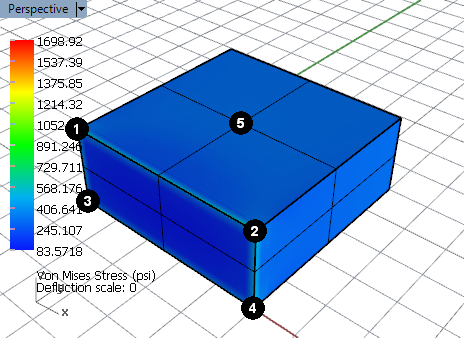
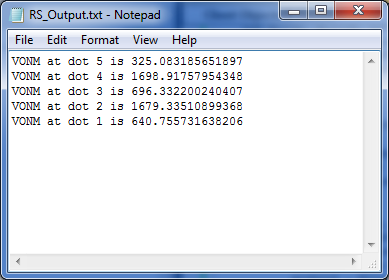
Running the example RhinoScript will generate a text file that reports the solution values at each text dot location. Opening the output text file in Notepad, the value of the solution at each dot is clearly seen: