Getting Started
Internal Forces
The following example demonstrates how stresses computed using Scan&Solve can be integrated to approximate the internal forces acting in a model. The inputs are hard-coded for the model linked to in this example. The model may be obtained here.
- function to numerically integrate SnS solution components (lines 5-22)
- function to compute triangle area (lines 26-31)
- function to integrate stress over a surface (lines 35-66)
- the main routine (lines 69-109)
For conciseness, this example contains minimal error checking.
Option Explicit

'DuffyIntegrateSnS: Integrate over the triangle defined by the array of vertices
'in arrVerts using a Duffy 4 pt order 3 quadrature rule
Function DuffyIntegrateSnS(objSnSPlugin, strObject, strComponent, arrVerts)
	Dim DuffyWts:DuffyWts = Array(0.105662432702594, 0.105662432702594, 0.394337567297406, 0.394337567297406)
	Dim DuffyCoords:DuffyCoords = Array(0.044658198738520, 0.166666666666667, 0.788675134594813, 0.166666666666667, 0.044658198738520, 0.788675134594813, 0.166666666666667, 0.622008467928146, 0.211324865405187, 0.622008467928146, 0.166666666666667, 0.211324865405187)

	Dim quadPt(2),coord
	Dim area: area = TriangleArea(arrVerts)
	Dim sum: sum = 0
	Dim quadID: quadID = 0
	While quadID <= UBound(DuffyWts)
		For coord= 0 To 2
			quadPt(coord) = (arrVerts(0)(coord) * DuffyCoords(quadID * 3)) + (arrVerts(1)(coord) * DuffyCoords(quadID * 3 + 1)) + (arrVerts(2)(coord) * DuffyCoords(quadID * 3 + 2))
		Next
		sum = sum + DuffyWts(quadID) * objSnSPlugin.QuerySolutionValue(strObject, strComponent, quadPt)
		quadID = quadID + 1
	Wend
	sum = sum * area
	DuffyIntegrateSnS = sum
End Function

'TriangleArea: Utility function to compute the area of the triangle defined
'by the array of vertices in arrVerts
Function TriangleArea(arrVerts)
	Dim vec0: vec0 = Rhino.VectorSubtract(arrVerts(1), arrVerts(0))
	Dim vec1: vec1 = Rhino.VectorSubtract(arrVerts(2), arrVerts(0))
	Dim vecCross: vecCross = Rhino.VectorCrossProduct(vec0, vec1)
	TriangleArea = 0.5 * Rhino.VectorLength(vecCross)
End Function

'StressForce: Utility function to integrate a stress component over a surface
'defined by strSurfaceObject
Function StressForce(objSnSPlugin, strSolidObject, strSurfaceObject, strComponent)
	Dim meshObject,arrFaces,arrVerts(2),fid
	Dim sumSF: sumSF = 0

	'Extract the analysis mesh for the surface object
	If Rhino.IsObject(strSurfaceObject) Then
		meshObject = Rhino.ExtractAnalysisMesh(strSurfaceObject)
	Else
		Rhino.Print "Invalid surface object"
		StressForce = 0
	End If

	'Integrate the desired stress component over the extracted mesh
	If Not isNull(meshObject) Then
		Rhino.MeshQuadsToTriangles meshObject
		arrFaces = Rhino.MeshFaces(meshObject, False)
		If IsArray(arrFaces) Then
			fid = 0
			While fid <= UBound(arrFaces)
				arrVerts(0) = arrFaces(fid)
				arrVerts(1) = arrFaces(fid + 1)
				arrVerts(2) = arrFaces(fid + 2)
				fid = fid + 3
				sumSF = sumSF + DuffyIntegrateSnS(objSnSPlugin, strSolidObject, strComponent, arrVerts)
			Wend
		End If
		Rhino.DeleteObject meshObject
	Else
		Rhino.Print "Unable to extract analysis mesh"
	End If
	StressForce = sumSF
End Function

Call Main()
Sub Main()
	On Error Resume Next
	Dim objFSO, objFile, strFileLocation
	Dim objSnSPlugin
	Dim strSolidObject : strSolidObject = Rhino.GetObject("Select a solid")

	'Prompt for the output filename
	strFileLocation = Rhino.SaveFileName("Output Filename", "*.txt", "", "RS_Output.txt", "txt")
	Set objFSO = CreateObject("Scripting.FileSystemObject")
	If Not isNull(strFileLocation) Then
		Set objFile = objFSO.CreateTextFile(strFileLocation, True)
	End If

	Set objSnSPlugin = Rhino.GetPluginObject("SnSScript")

	If Err Then
		MsgBox Err.Description
		Exit Sub
	End If

	Dim arrInputs(3), interfaceID, Force
	'The zeroth element of these arrays corresponds to the GUIDs of the planes at the interfaces
	arrInputs(1) = Array("86e088cc-66be-4dec-afaa-db4cab66a622", "SIGZX", " N on Z-Face in X-Direction")
	arrInputs(2) = Array("1b965e90-355d-4228-b0ae-182e30ee42a8", "SIGZX", " N on Z-Face in X-Direction")

	'Turn off output from SnSScript (turn on for debugging)
	objSnSPlugin.SetOutputOnOff False

	interfaceID = 1
	While interfaceID <= UBound(arrInputs)
		If Rhino.IsObject(arrInputs(interfaceID)(0)) Then
			Force = StressForce(objSnSPlugin, strSolidObject, arrInputs(interfaceID)(0), arrInputs(interfaceID)(1))
			If Not isNull(objFile) Then
				objFile.WriteLine "Shearing force on interface " & interfaceID & " is " & Force & arrInputs(interfaceID)(2)
			Else
				Rhino.Print "Shearing force on interface " & interfaceID & " is " & Force & arrInputs(interfaceID)(2)
			End If
		End If
		interfaceID = interfaceID + 1
	Wend
End Sub
| Line # | Description |
|---|---|
| 1 | Only scripts with Option Explicit specified can be debugged in the RhinoScript editor (Monkey). |
| 5-22 | Define a function to numerically integrate a solution component over a triangle. |
| 6-7 | Define the quadrature weights and points for integrating over a triangle. |
| 10 | Compute the area of the current triangle. |
| 13-19 | Iterate over quadrature weights and points, evaluating the integral of the specified solution component. |
| 26-31 | Define a function to compute the area of a triangle using the cross-product. |
| 35-66 | Define a function to integrate a solution component over a surface in Rhino. |
| 40-45 | Extract a mesh approximation of the surface. |
| 49 | Convert the mesh quads to triangles for compatibility with integration algorithm. |
| 53-59 | Integrate over each mesh face, accumulating their contributions in sumSF. |
| 61 | Delete the mesh object for the surface. |
| 69-109 | The main body of the script. |
| 73 | Prompt the user to select a solid from the Rhino document. The solid is identified by its GUID stored in strObject. |
| 76 | Prompt the user for an output filename. |
| 77-80 | Create the text file object. |
| 82 | Obtain a reference to the SnSScript plug-in, exit if an error occurs. |
| 91-92 | Specify the GUIDs of the surfaces over which integration is to be performed, the stress component to integrate, and the textual description of the result. Rhino's What command is used to provide the GUIDs of the surfaces. |
| 95 | Turn off the command line output of SnSScript. |
| 98-108 | Iterate over surfaces, integrate stress on each, and write output to a file or the command line. |
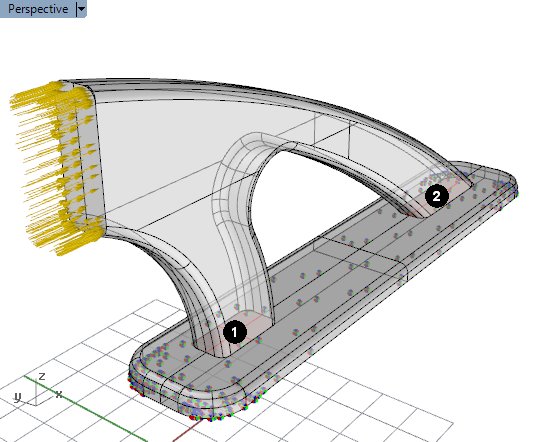
The solid model for this example has a 2000 N force applied to the vertical face on the left and is fixed on the bottom face. We are interested in computing the shear forces in the X-direction on surfaces (1) and (2) using the above script.
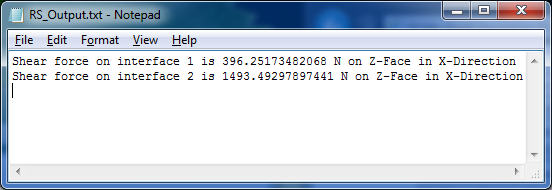
Running the example RhinoScript will generate a text file that reports the shearing forces on the specified surfaces. The output can be viewed using Notepad (below) or imported into another application.
To determine the approximate magnitude of other forces at these surfaces, the desired stress components at lines 91 and 92 can be changed along with the corresponding descriptions.