Contents Menu Expand Light mode Dark mode Auto light/dark, in light mode Auto light/dark, in dark mode Skip to content
Intact.Simulation & LevelOpt Docs
Logo
Intact.Simulation & LevelOpt Docs

About Intact

  • Intact Documentation Home
  • Intact Core Technology
  • LevelOpt Topology Optimization

Examples & Benchmarks

  • Quick Start Examples
  • Validation Benchmarks
    • Linear Static Elasticity
      • 1.1: Cantilever Beam under Gravity
      • 1.2: Cantilever Beam under Different Loading
      • 1.3: Curved Beam under Different Loading
      • 1.4: Stress Concentration in Plate with Hole
    • Modal
      • 2.1: Tapered Beam
      • 2.2: Clamped Square Plate
      • 2.3: Free Thin Square Plate
      • 2.4: Thick Rhombic Plate
    • Thermal
      • 3.1: Wall with Convection
      • 3.2: Bar with Fixed Temperature and Convection
      • 3.3: Cylinder with Convection
      • 3.4: Cylinder with Fixed Temperatures
      • 3.5: Frame with Fixed Temperatures

Product Guides

  • Intact Python API
    • Installation
    • Quick Start Examples
    • Getting Started
    • How To: Units, Geometry, & Materials
    • How To: Boundary Conditions
    • How To: Simulation Scenarios
    • How To: Simulation Results & Queries
    • How To: LevelOpt
    • Examples
    • pyintact API
  • Intact Command Line Interface
    • Installation
    • Quick Start Examples
    • Getting Started
    • Command Line Options
    • How To: Units and Geometry
    • How To: Boundary Conditions
    • How To: Internal Conditions
    • How To: Metadata and Physics Types
    • How To: Thermoelasticity
    • How To: Level Set Topology Optimization (LevelOpt)
    • LevelOpt: Examples
    • OpenMP
    • Logging and Simulation Verification Tools
  • IntactSDK 1.1.19 User’s Manual
    • Installation and Usage
    • Quick Start Examples
    • Getting Started
    • How To: Units, Geometry, & Materials
    • How To: Boundary Conditions
    • How To: Simulation Scenarios
    • How To: Simulation Results & Queries
    • How To: LevelOpt
    • Examples
  • Intact for nTop
  • Intact for Rhino Grasshopper
    • Getting Started
      • Installing or Updating Intact.Simulation for Grasshopper
      • Changelog from Major Updates
      • Activating or Migrating License for Intact.Simulation for Grasshopper
      • Valid Rhino Models for Intact.Simulation for Grasshopper
      • Basic Operation
      • Unit System
      • Tips and Tricks
    • Advanced Capabilities
      • LevelOpt Manual
      • OpenVDB models
      • Automation
      • Using lists for Intact components
    • Components and Assemblies
    • Materials
    • Pick Face Block
    • Restraints
    • Structural Loads
      • Surface Loads
      • Displacement Boundary Condition
      • Sliding Boundary Condition
      • Body Loads
    • Thermal Loads
      • Thermal Boundary conditions
      • Thermal Body Load
    • Solver Settings
    • Solvers
      • Stress Solver
      • Modal Solver
      • Thermal Solver
    • Results and Visualization
    • LevelOpt Blocks
    • LevelOpt Setting Descriptions
    • LevelOpt Examples
    • Beginner Examples
      • Ex-1: Stress simulation of a bonded assembly
      • Ex-2: Thermal simulation of a heat sink
      • Ex-3: Modal Simulation of a drone
      • Ex-4: Planar Orthotropic Materials: Transformation Workflow
      • Ex-5: Static Simulation of a Composite Motor Mount
      • Ex-6: Automation of a variable geometry heat sink
    • Advanced Examples
      • Ex-4: Displacement Boundary Conditions
      • Ex-5: Using VDB implicits for lattice infill
      • Ex-6: Linear Elements vs Quadratic Elements
      • Ex-7: Sampling Custom Points
      • Ex-8: Cylindrical Sliding Boundary Conditions
      • Ex-9: Hydrostatic Loading Conditions
    • Benchmarking Examples
      • Static Scenario: Multi-Load Cantilever
      • Static Scenario: Plate with Hole (Stress Concentration)
      • Orthotropic Laminate Plate Stress Analysis
      • Modal Scenario: Clamped Square Plate
      • Modal Scenario: Free Thin Square Plate
    • Custom Workflows and Tools
      • Extract Min/Max of the Solution
      • Visualize Intact’s Solution Grid
    • Troubleshooting Guide
    • Intact.Simulation for Grasshopper Frequently Asked Questions
  • Intact for Synera

Support

  • Intact License Manager User Manual
  • Intact.Simulation Best Practices
  • Contact Us
Back to top

Modal Scenario: Clamped Square Plate

Geometry & Materials Setup

The geometry and grasshopper files for this example are available for download
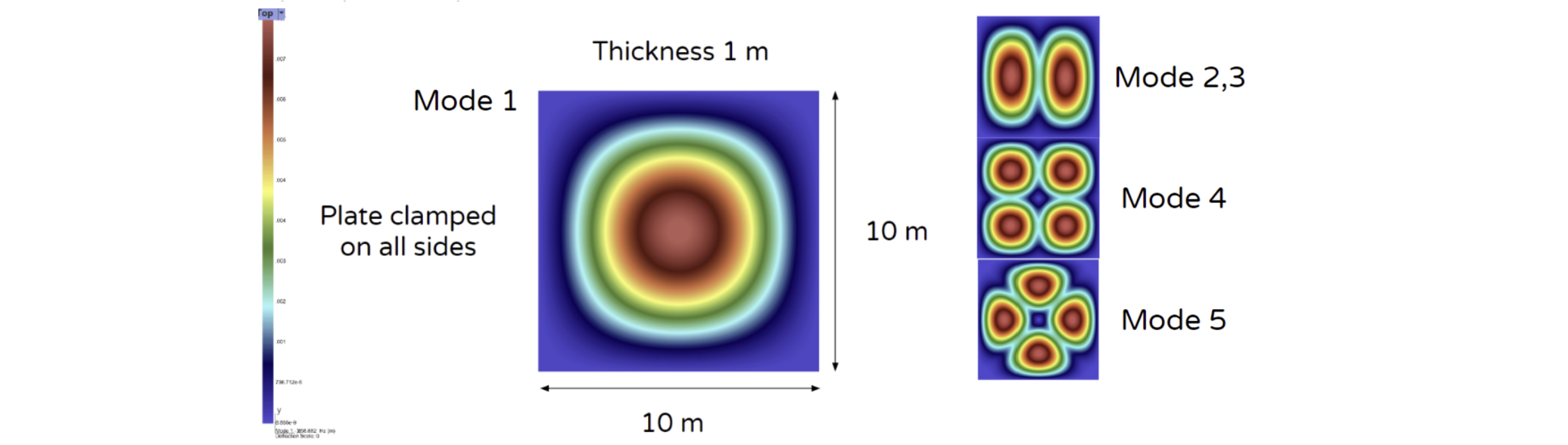
clamped_squareplate_setup.png

Materials:

  • Isotropic

  • Young’s Modulus: 2.4 GPa

  • Poisson’s Ratio: 0.35

  • Density: 1020 kg/m3

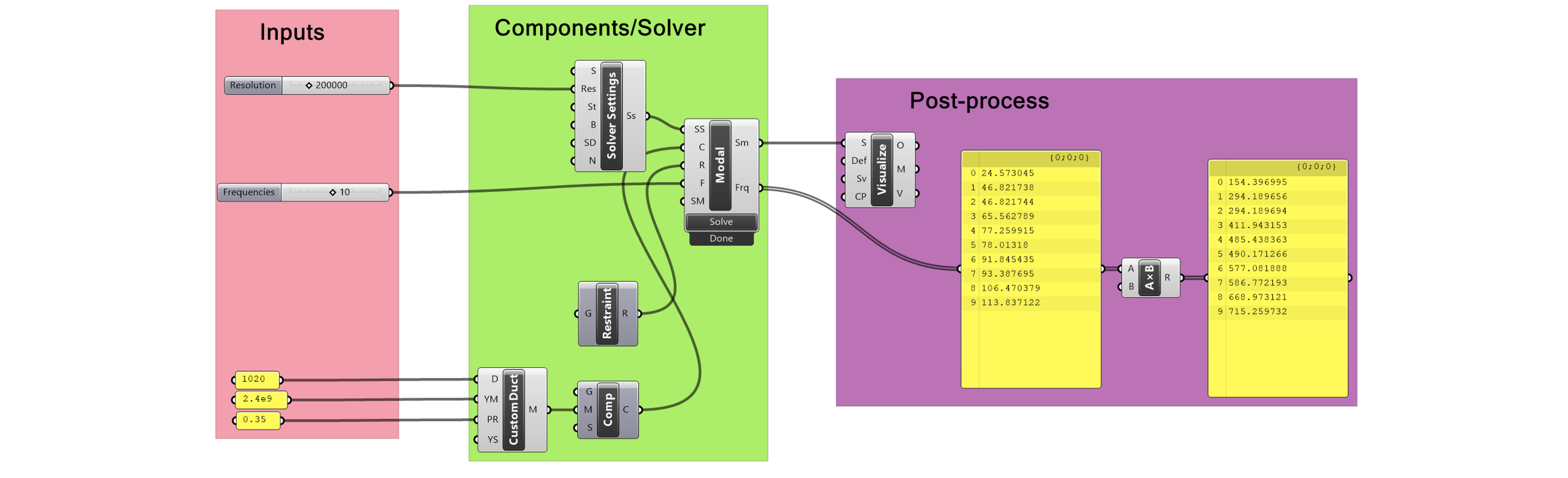
Grasshopper File

clamped_squareplate_grasshopper.png

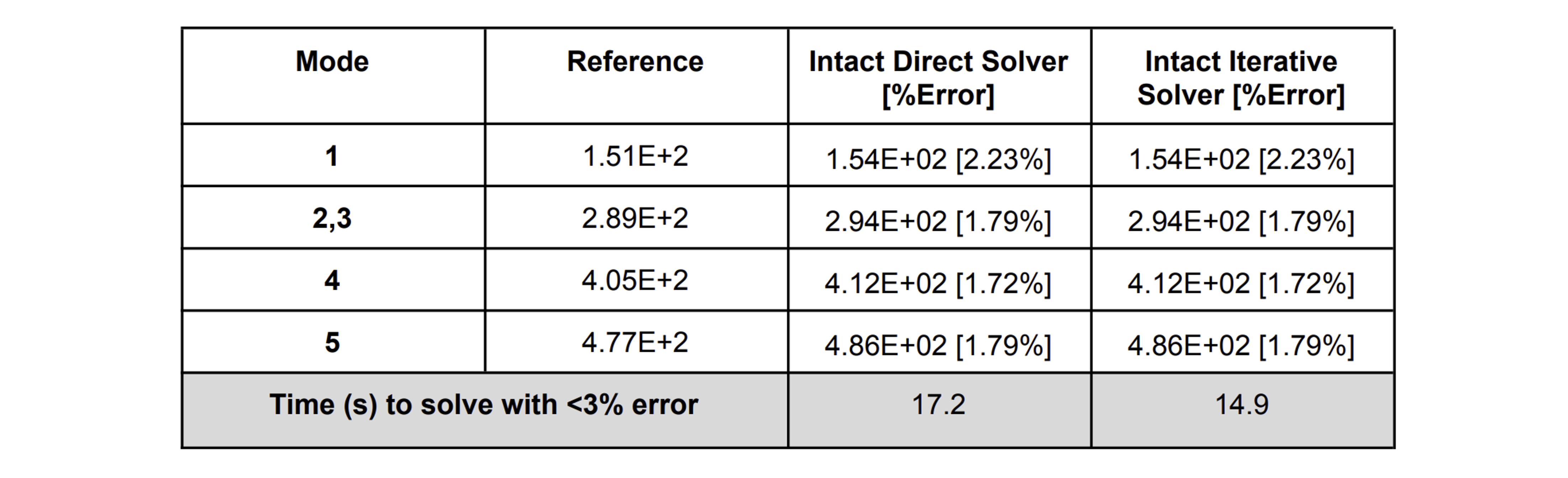
Reference Results

clamped_squareplate_table.png

Next
Modal Scenario: Free Thin Square Plate
Previous
Orthotropic Laminate Plate Stress Analysis
Copyright © 2025, Intact Solutions
Made with Sphinx and @pradyunsg's Furo
On this page
  • Modal Scenario: Clamped Square Plate
    • Geometry & Materials Setup
    • Grasshopper File
    • Reference Results